Lior Friedler
A practical comparison of Amazon Kinesis and Apache Kafka for stream processing. Learn when each platform makes sense based on scale, operational requirements, and cost.
The streaming platform decision often gets framed as "managed vs self-hosted", but that oversimplifies the engineering trade-offs. AWS Kinesis and Apache Kafka solve similar problems with fundamentally different operational models, cost structures, and scaling characteristics. Neither is universally better.
The right choice depends on your scale, team expertise, and how deeply you're invested in the AWS ecosystem. At moderate throughput with strong AWS integration requirements, Kinesis delivers simplicity that's hard to beat. At a very large scale where you have operational capacity, self-managed Kafka on EC2 or EKS can yield better performance and ROI. This guide breaks down when each approach makes sense.
Architecture and Operational Models
Kinesis: Managed Shards
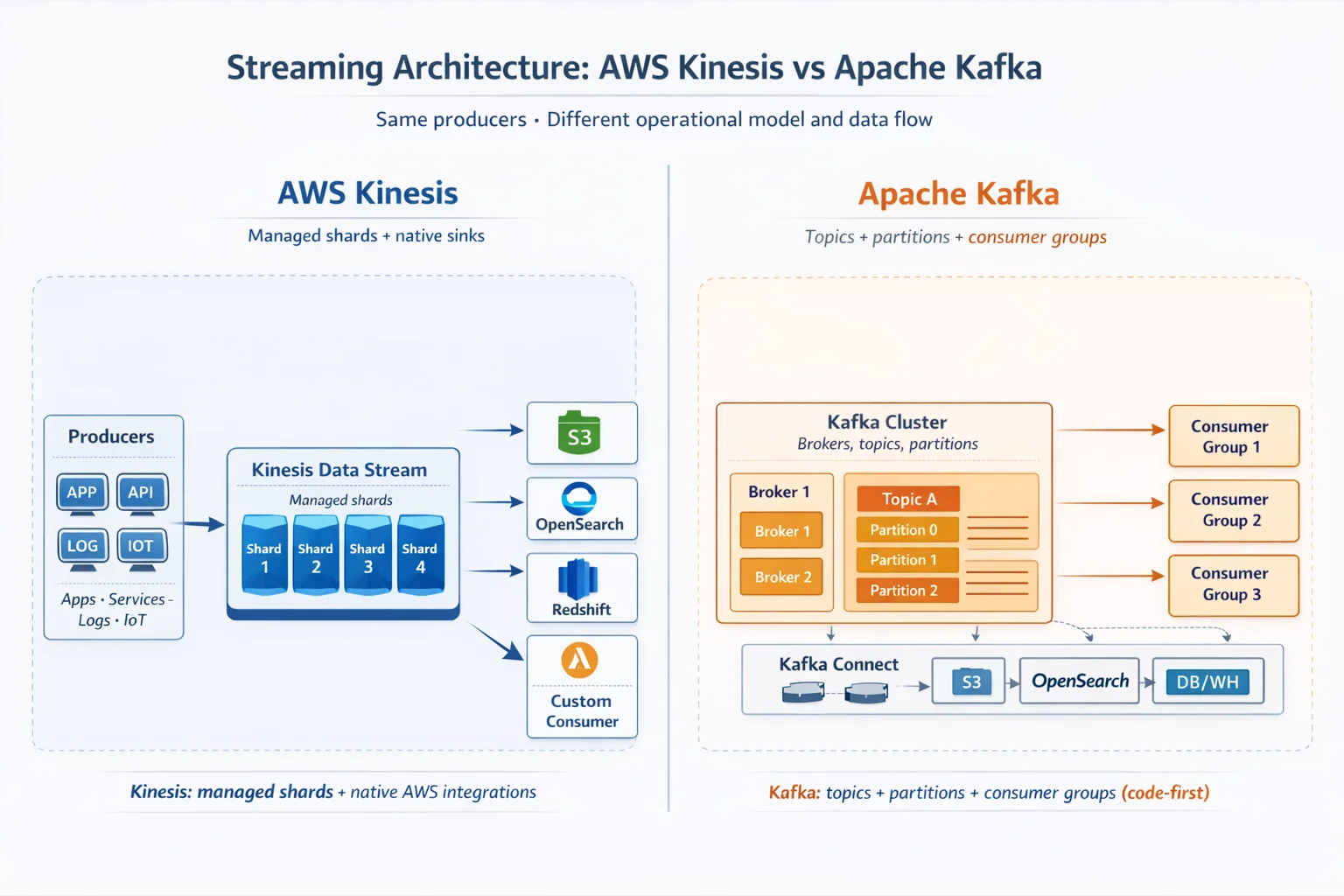
Kinesis Data Streams organizes data into shards. Each shard provides 1 MB/s write and 2 MB/s read capacity. You provision shards explicitly (or use on-demand mode), and AWS handles the underlying infrastructure. There's no cluster to manage, no broker coordination, and no ZooKeeper - just shards and your application code.
On-demand capacity mode, introduced to simplify scaling, supports up to 200 MB/s write throughput (200 shards equivalent) by default, scaling up to 10 GB/s per stream with increased limits. This removes capacity planning entirely for variable workloads, though at a premium cost.
Kafka: Partitions and Brokers
Kafka distributes data across partitions hosted on broker nodes. As of Kafka 4.0 (released March 2025), KRaft mode is the default and ZooKeeper has been removed entirely. This simplifies deployment: you no longer need a separate ZooKeeper ensemble, but you still manage the broker cluster, storage, networking, and replication.
Kafka's architecture gives you direct control over hardware, replication factors, and partition assignment. This flexibility enables performance optimization that isn't possible with Kinesis, but requires operational expertise. You're responsible for broker failures, partition rebalancing, and cluster upgrades.
Management Overhead
The operational gap is significant. Kinesis requires near-zero infrastructure management as AWS handles availability, durability, and scaling within shard limits. Kafka requires dedicated operational investment: monitoring broker health, managing disk capacity, planning partition layouts, and handling version upgrades.
For teams without streaming operations experience, Kinesis's managed model eliminates an entire category of on-call incidents. For teams with strong platform engineering capabilities, Kafka's operational overhead may be acceptable in exchange for performance control.
Performance and Throughput Characteristics
Per-Unit Limits
Kinesis shards have hard limits: 1 MB/s or 1,000 records/second for writes, 2 MB/s for reads. These are non-negotiable. To increase throughput, you add shards. Scaling is linear but explicit.
Kafka partitions have no inherent throughput limit; they're constrained by broker hardware. A well-tuned Kafka cluster on modern SSDs can handle 30,000+ messages per second per partition, with aggregate cluster throughput reaching millions of messages per second depending on hardware. We even saw 100k/sec and above per partition with sensible message sizes.
Message Size
Both platforms default to 1 MB maximum message size. Kinesis recently added support for messages up to 10 MB with explicit configuration (as of October 2025), though this requires enabling enhanced fan-out and may impact costs. Kafka can be configured for larger messages by adjusting message.max.bytes and related broker/producer settings.
In practice, message size is rarely a differentiator. If you're consistently hitting size limits, you should evaluate whether your architecture should use object storage (e.g. AWS S3) with metadata references instead.
Latency Considerations
Kinesis provides consistent single-digit millisecond latency for writes, with read latency depending on consumer configuration. Enhanced fan-out delivers dedicated 2 MB/s per consumer with sub-200ms propagation delay.
Kafka latency depends heavily on your deployment: broker hardware, replication settings, and network topology all factor in. Well-tuned deployments achieve sub-10ms end-to-end latency, but this requires deliberate configuration and monitoring. Client configurations (consumer code efficiency, available resources, concurrency) also play a large role in squeezing every bit of performance from the streaming platform you use.
AWS Integration Ecosystem
Kinesis's strongest advantage is native AWS integration. Kinesis Data Firehose provides zero-code delivery to:
- Amazon S3: Buffered writes with configurable intervals and compression
- Amazon OpenSearch Service: Direct indexing without Lambda or custom consumers
- Amazon Redshift: COPY commands executed automatically
- Splunk: Native HTTP Event Collector integration
These integrations handle batching, retries, error handling, and format conversion. Building equivalent pipelines with Kafka requires Kafka Connect connectors, which are powerful but demand configuration and operational attention.
Lambda Integration
Kinesis integrates directly with Lambda as an event source. Lambda automatically polls shards, manages checkpoints, and scales consumers based on shard count. For event-driven architectures already built on Lambda, this reduces integration code substantially.
Kafka can trigger Lambda via Amazon MSK (Managed Streaming for Apache Kafka), but the integration is less mature. Many Kafka deployments use dedicated consumer applications rather than serverless functions.
Kafka Connect Ecosystem
Kafka Connect offers a broader connector ecosystem. Dozens of connectors for databases, cloud services, and data stores. The trade-off is operational: you run Connect workers, manage connector configurations, and monitor task status. For complex integration scenarios beyond AWS services, Kafka Connect's flexibility often wins.
Cost Analysis: When Each Makes Sense
Kinesis Pricing
Kinesis Data Streams charges $0.015 per shard-hour in provisioned mode, plus $0.014 per million PUT payload units. On-demand mode charges $0.04 per GB written and $0.04 per GB read. It is indeed simpler but roughly 2-3x more expensive at steady throughput.
For 10 shards running continuously: ~$108/month base cost plus data transfer.
Kafka Cost Structure
Self-managed Kafka costs depend on your infrastructure choices. Running 3 broker nodes on m5.xlarge instances (4 vCPU, 16GB RAM) costs roughly $300/month before storage. Add EBS volumes, data transfer, and operational time, and total cost varies widely based on throughput and retention requirements.
Amazon MSK simplifies operations at a premium: $0.21-$0.75 per broker-hour depending on instance type, plus storage and data transfer. MSK Serverless charges per cluster-hour plus throughput, targeting variable workloads.
Break-Even Considerations
At moderate scale (under 100 MB/s), Kinesis with Firehose often wins on total cost when you factor in operational overhead. The managed integrations eliminate custom code and reduce monitoring burden.
Kafka partition limits are soft limits based on cluster performance and configuration (typically a maximum of around 4,000 partitions per broker), while Kinesis has explicit, hard-coded limits per shard that are managed by AWS, though they can be increased to an extent upon request. For some workloads, this can make a big difference in cost and performance.
At large scale (500+ MB/s sustained), self-managed Kafka on EC2 or EKS typically delivers better price-performance, but only if your team has the expertise to operate it efficiently. The break-even point depends heavily on your operational costs and scale trajectory.
Frequently Asked Questions
Is AWS Kinesis the same as Kafka?
No. Both are streaming platforms, but Kinesis is a fully managed AWS service organized into shards with fixed capacity, while Kafka is open-source software that distributes data across partitions on broker nodes you operate yourself (or via Amazon MSK).
What are the throughput limits of a Kinesis shard?
Each Kinesis shard provides 1 MB/s or 1,000 records per second for writes and 2 MB/s for reads. These are hard limits; to scale you add shards, and on-demand mode supports up to 200 MB/s write by default and up to 10 GB/s per stream with increased limits.
Is Kafka faster than Kinesis?
Kafka partitions have no inherent throughput limit and a well-tuned cluster can handle 30,000+ messages per second per partition (we have seen 100k/sec and above), with sub-10ms end-to-end latency when deliberately configured. Kinesis offers consistent single-digit millisecond write latency and sub-200ms propagation with enhanced fan-out, but per-shard limits are fixed.
Which is cheaper, Kinesis or Kafka?
At moderate scale (under 100 MB/s), Kinesis with Firehose usually wins on total cost once operational overhead is included; 10 provisioned shards cost roughly $108/month plus data transfer. At 500+ MB/s sustained, self-managed Kafka on EC2 or EKS typically delivers better price-performance, but only if your team can operate it efficiently.
Does Kafka still need ZooKeeper?
No. As of Kafka 4.0, released in March 2025, KRaft mode is the default and ZooKeeper has been removed entirely, though you still manage the broker cluster, storage, networking and replication.
When should I choose Amazon MSK instead of Kinesis or self-managed Kafka?
Choose MSK when you want Kafka semantics and the Kafka Connect ecosystem with reduced operational burden, including managed version upgrades and automatic rebalancing, and are willing to pay a premium of $0.21-$0.75 per broker-hour plus storage and data transfer.
Key Takeaways
Choose Kinesis when:
- Your throughput is moderate and predictable
- You need native integrations with S3, OpenSearch, Redshift, or Lambda
- Your team lacks dedicated streaming operations expertise
- You're building within an AWS-centric architecture
Choose Kafka when:
- You need throughput beyond Kinesis shard limits at reasonable cost
- You require fine-grained control over partitioning and replication
- Your team has operational capacity for cluster management
- You need the broader Kafka ecosystem, such as Kafka Connect and more.
Consider MSK when:
- You want Kafka semantics with reduced operational burden - through managed version upgrades, zero-etl (S3 delivery), automatic rebalance and more.
- You're willing to pay a premium for managed Kafka on AWS
There's no universal winner. The streaming platform that makes sense for a 10-person startup building on Lambda differs from what a platform team at scale should choose. Match the operational model to your team's capabilities and the integration model to your architecture.